
Product & variant attributes
Product & variant attributes are Logistified-owned fields you can attach to products or variants. They can stay internal to Logistified, or they can be linked to an existing Shopify metafield. Purchase-order constraints use these attributes when you assign a constraint role such as Product MOQ, Unit CBM, or Purchase family.
The page can be explored on any plan, but creating, renaming, or deleting attribute definitions, and editing the values stored on products or variants, requires the Elevate plan.
On this page
Section titled “On this page”- Where to configure attributes
- Attribute definition fields
- Shopify metafield links
- Money values
- Constraint roles
- Managed attributes from Data Modeling
- Attribute values and fallbacks
- Validation and save behavior
- See also
Where to configure attributes
Section titled “Where to configure attributes”Open Settings -> Products -> Attribute Definitions.
Use this page when you need a product or variant field that does not exist in Logistified by default: product-level MOQ, unit volume, unit weight, case size, purchase family, compliance status, or any similar planning value.
Attribute definition fields
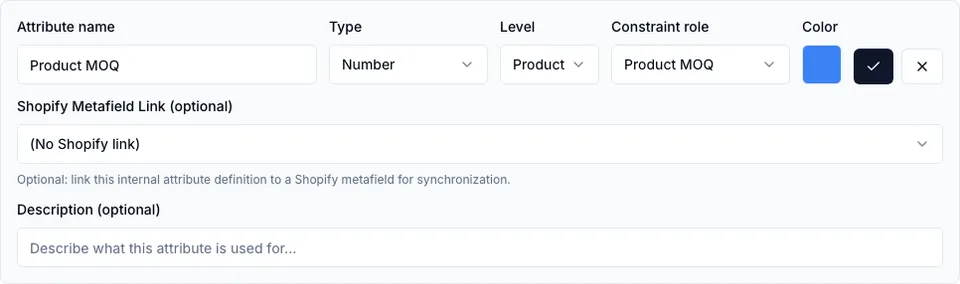
Section titled “Attribute definition fields”Each attribute definition has:
| Field | What it controls |
|---|---|
| Attribute name | The merchant-facing label shown in Product Settings, product/variant detail, PO constraint binding, and relevant tables. Names must be unique. |
| Type | The value format: Text, Number, Money, Date, Yes/No, List, or Linked table row. |
| Level | Product or Variant. Product-level values apply to the product as a whole; variant-level values apply to one variant. |
| Constraint role | Optional semantic meaning used by Constraint Studio and the optimizer. |
| Color | Visual color used for the attribute chip. |
| Shopify Metafield Link | Optional namespace.key link to an existing Shopify product or variant metafield. |
| Description | Optional helper text for your team. |
Choose Product level when one value should be shared by all variants of a product. Product MOQ is the common example: a rule should sum every variant on the PO and compare the product total to one product-level MOQ value.
Choose Variant level when each variant can have its own value, such as unit CBM, unit weight, case size, or purchase family.
Shopify metafield links
Section titled “Shopify metafield links”The Shopify link is optional. If you leave it empty, the attribute is stored and edited only in Logistified.
When you enter a Shopify metafield key:
- Use
namespace.key. - Product-level attributes are verified against Shopify product metafield definitions.
- Variant-level attributes are verified against Shopify variant metafield definitions.
- A duplicate key for the same owner type is rejected.
- Linked table row attributes cannot be linked to Shopify metafields.
Use Refresh or Verify after creating new Shopify metafield definitions so Logistified can check that the owner type and key match.
When you pick a Shopify metafield key on a new attribute, Logistified looks at how that metafield is set up in Shopify and pre-selects the matching Type — Money for a Shopify money metafield, Number for a numeric one, Date for a date, Yes/No for a boolean, and Text for everything else. Pick a different Type yourself and Logistified leaves it alone. When you edit an existing attribute, picking another key never changes its Type either — the hint below tells you if the two no longer match.
If the Type you’ve chosen doesn’t match what Shopify expects — for example, Text on a money metafield — a hint appears under the key field suggesting the better Type. This is only a suggestion: it never blocks saving, and Verify shows the same warning after the fact if the mismatch is still there.
Money values
Section titled “Money values”Choose Money for attributes that hold a price or another amount, such as a supplier’s list price or a landed-cost surcharge. Money values are always stored in your shop’s currency — the same rule Shopify applies to its money metafields — so a value that names a different currency is refused when you save or import it.
- A value you type in without a currency is saved in your shop’s currency.
- On the product/variant detail page, the amount field shows your shop’s currency as a suffix; saving from there always re-saves the amount in your shop’s currency.
- In the Product Settings grid, a Money column shows the amount with your shop’s currency, and you can sort and filter it (greater than, less than, between, equals) the same as a Number column.
- Exporting a Money column includes the currency in the column header; importing a file with that header maps back to the same attribute automatically.
- Money attributes can’t be used for a constraint role (see Constraint roles below) and aren’t written back to Shopify — like every other attribute, the value stays in Logistified.
Constraint roles
Section titled “Constraint roles”Constraint roles tell Constraint Studio what an attribute means. A role can be assigned directly on an attribute definition, or through a Data Modeling semantic mapping.
| Role | Allowed attribute types | Typical use |
|---|---|---|
| Group key | Text, List | Exact group count, group minimum total, group coverage. |
| Unit CBM | Number | PO max CBM, container fill, capacity block fill. |
| Unit weight | Number | PO max weight and weight-based fill rules. |
| Case size | Number | Case-size or multiple-based planning. |
| Pallet quantity | Number | Pallet/capacity planning. |
| Purchase family | Text, List | Coverage, ratio, or bundle rules by commercial family. |
| Product MOQ | Number | Product-level MOQ summed across all variants on the PO. |
Only one active attribute can use the same constraint role. If you try to assign Unit CBM to a second attribute, Logistified asks you to remove the first assignment or choose another role.
Managed attributes from Data Modeling
Section titled “Managed attributes from Data Modeling”Data Modeling can create Linked table row attributes automatically so a product or variant can point to a custom Data Model row. Those managed attributes are marked as managed, are read-only on this page, and cannot be deleted from Product Settings.
If you need to change the table, fields, rows, or semantic role behind a managed attribute, do it in Settings -> Data Modeling instead.
Attribute values and fallbacks
Section titled “Attribute values and fallbacks”Definitions only describe the field. Values are entered on the product/variant surfaces that show Product Settings attributes.
Values can be global or location-specific. When a location-specific value is missing, Logistified falls back to the global value for the same product or variant. Constraint evaluation uses the resolved value available for the PO context; if a required value is still missing, the PO hint explains which role or field is missing.
Validation and save behavior
Section titled “Validation and save behavior”Logistified validates both client-side and server-side:
- Attribute names must be present and unique.
- List attributes need at least one option.
- Options are only valid for List attributes.
- Linked table row attributes need a target table.
- Constraint roles must match the attribute type.
- Duplicate Shopify keys and duplicate constraint roles are rejected.
- Save buttons lock while a save is in flight.
- If you cancel or navigate away with an unsaved draft, Logistified asks before discarding it.
- On a plan below Elevate, save actions are refused with a message pointing you to upgrade; everything above still displays so you can see what’s configured.
See also
Section titled “See also”- Settings -> Data Modeling - custom tables, rows, values, and semantic mappings.
- Purchase Orders -> Constraint Studio - building rules from attributes.
- Guide -> Configure purchase-order constraints - worked Product MOQ and CBM examples.
- AI / Agent access -> Operating data modeling & product attributes - what a connected assistant can manage here.