
Use the constraint optimizer
Elevate plan
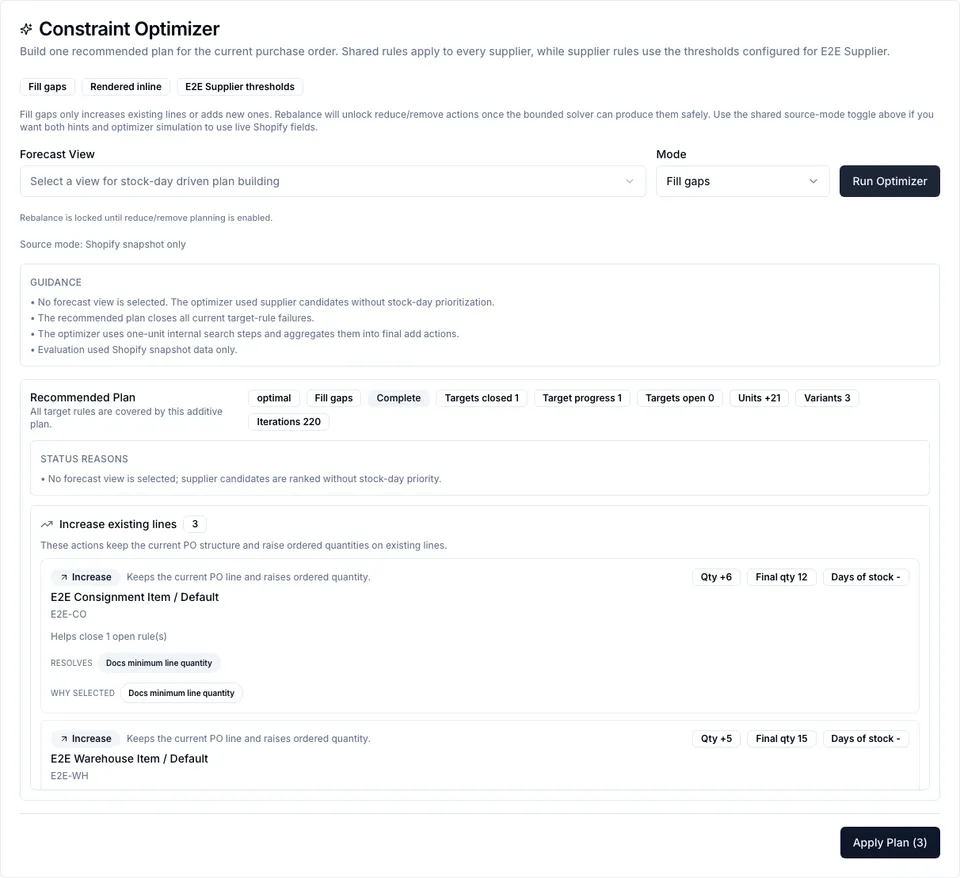
Review every suggested action before applying. The plan explains what it resolves and what remains open.
Before you start
Section titled “Before you start”- Constraint rules are configured in Settings -> Purchase Orders -> Constraints.
- Required Product Settings attributes or Data Model semantic mappings are saved.
- The PO is in Draft or Sent status.
- You understand that Fill gaps can only add or increase quantities.
- Open the purchase order detail page.
- Review constraint badges and purchase-order hints.
- Click Optimize.
- Optionally select a Forecast View for stock-day ranking.
- Keep Mode set to Fill gaps.
- Click Run Optimizer.
- Review the status, guidance, status reasons, remaining rule reasons, and proposed actions.
- Click Apply Plan.
- Confirm the apply summary.
- Run Sync to Shopify later if you want the updated incoming quantities pushed to Shopify.
Worked examples
Section titled “Worked examples”Product MOQ: A product has two variants on the PO. The Product MOQ field says 100, but the variants only total 72. Fill gaps can increase one existing line or add another supplier variant so the product total reaches 100.
Pack size: A PO line has quantity 18 and pack size 12. Fill gaps can suggest 24 because it only increases quantity and the final value is a valid multiple.
Budget cap: A PO is already over budget. Fill gaps cannot reduce or remove lines, so the optimizer reports the cap reason instead of applying a destructive change.
Supplier minimum value: A supplier requires a minimum order value. Fill gaps can add or increase eligible supplier lines until the threshold is reached, if enough candidate data exists.
Common failure modes
Section titled “Common failure modes”| Symptom | Likely cause | Fix |
|---|---|---|
Status is optimal with no actions | The PO already satisfies targeted rules. | Nothing to apply. |
Status is infeasible | Rules conflict, required data is missing, or Fill gaps cannot solve this violation. | Check status reasons, then adjust rules or data. |
Status is model_too_large | Too many supplier candidates were considered. | Narrow the supplier, view, or rule scope. |
| No pack-size suggestion appears | Pack size is missing for the variant. | Add/fix supplier pack size data. |
| Product MOQ is ignored | The Product MOQ field is not bound or missing values. | Map the Product MOQ role and fill product values. |
| Apply fails as stale | The PO changed after the optimizer run. | Reload, run the optimizer again, and apply the fresh plan. |
See also
Section titled “See also”- Purchase Orders -> Constraint optimizer
- Purchase Orders -> Constraint Studio
- Configure purchase-order constraints