
Constraint Studio
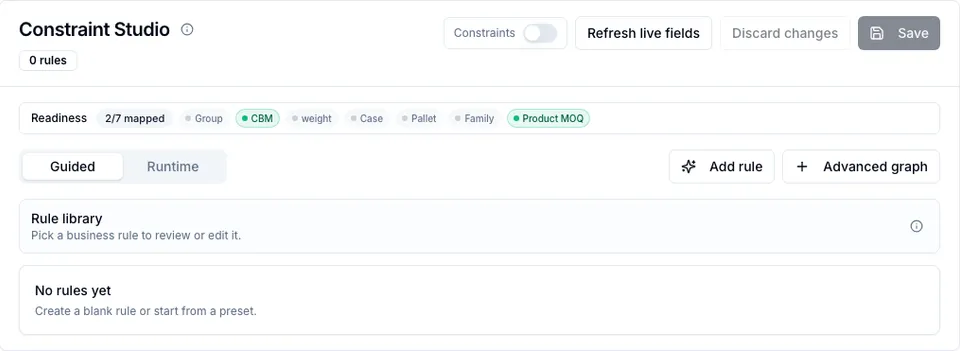
Constraint Studio is the rule editor behind PO hints and the constraint optimizerConstraint optimizerA PO detail tool that builds a proposed additive plan from configured constraint rules. In Fill gaps mode, it can increase existing lines or add eligible variants; you confirm before anything is applied. Elevate-plan feature. Read more → . You configure business rules in a guided workflow; the technical graph is still available through Advanced graph for inspection and power-user changes.
On this page
Section titled “On this page”- What a rule controls
- Constraint readiness
- Presets
- Rule metadata
- Field binding
- Preview and save
- Advanced graph nodes
- Where rules appear on POs
- See also
What a rule controls
Section titled “What a rule controls”A constraint rule can:
- Show line or PO-level hints when a PO is below MOQ, not in pack multiples, over budget, missing a group, or missing required data.
- Act as an optimizer target, so the optimizer tries to close the gap by adding eligible variants or increasing existing lines.
- Add an optimizer objective, so an already-valid plan is ranked toward a better fill or capacity outcome.
Rules are evaluated for Draft and Sent POs only. Other PO statuses keep their saved data, but active constraint rules do not apply there.
Constraint readiness
Section titled “Constraint readiness”The readiness section checks whether common semantic roles are mapped:
| Role | Used by |
|---|---|
| Group key | Group exact count, group minimum total, group coverage. |
| Unit CBM | PO max CBM, container fill, capacity blocks. |
| Unit weight | PO max weight and weight-based capacity rules. |
| Case size | Case-size and multiple-based planning. |
| Pallet quantity | Pallet or block-capacity planning. |
| Purchase family | Coverage, bundle, and family-based rules. |
| Product MOQ | Product-level MOQ summed across variants. |
Mapped roles can come from Product & variant attributes or from Data Modeling semantic mappings. Hover a readiness chip to see the exact field source. Missing roles do not block saving every rule, but presets that need that role ask you to bind a field manually.
Presets
Section titled “Presets”Click Add rule to open the preset picker.
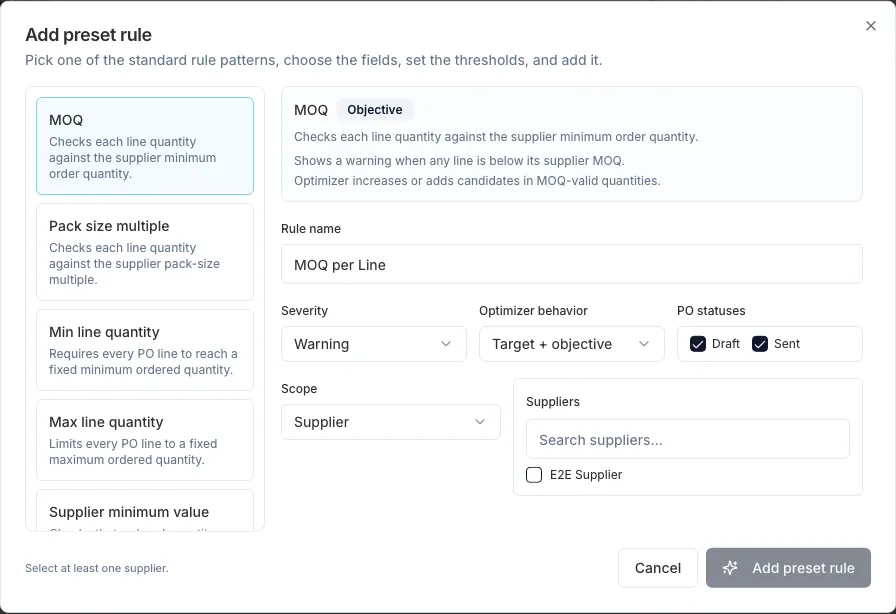
The current presets are:
| Preset | What it checks | Optimizer behavior |
|---|---|---|
| MOQ | Each line meets supplier-variant MOQ. | Can increase/add lines to meet MOQ. |
| Pack size / multiples | Each line is a valid pack multiple. | Final suggested quantities must respect multiples. |
| Min line quantity | Every line reaches a fixed minimum. | Can increase lines. |
| Max line quantity | Every line stays under a fixed maximum. | Fill gaps cannot reduce lines, so this appears as a warning/limit. |
| Supplier minimum value | PO value reaches a supplier minimum. | Can add/increase eligible lines. |
| Supplier minimum units | Total ordered units reach a supplier minimum. | Can add/increase eligible lines. |
| PO budget cap | PO value stays under a cap. | Fill gaps cannot reduce an over-budget PO. |
| PO max units | Total ordered units stay under a cap. | Hard limit for additive plans. |
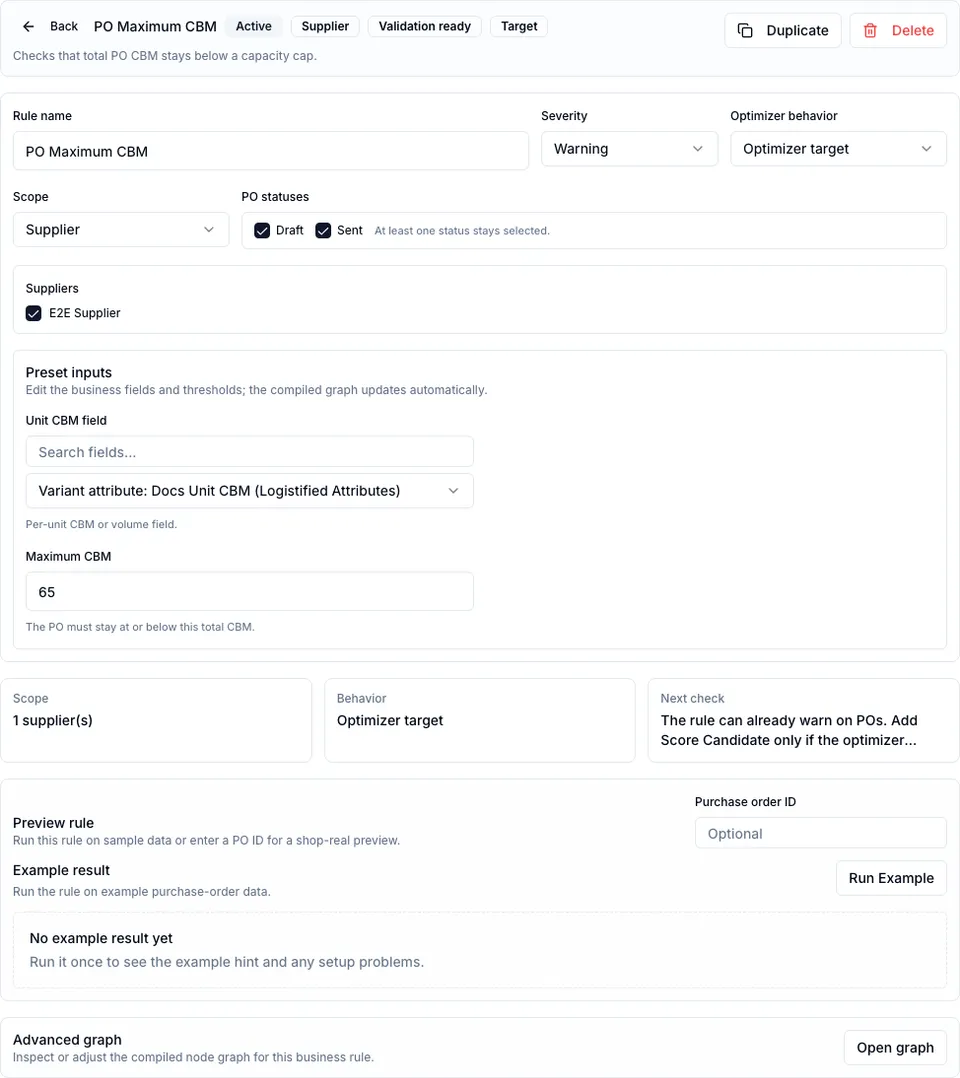
| PO max CBM | Ordered units times unit CBM stay under a cap. | Hard limit when the rule is a target. |
| PO max weight | Ordered units times unit weight stay under a cap. | Hard limit when the rule is a target. |
| Container fill target | Total capacity measure reaches a target. | Adds a fill objective. |
| Exact group count | PO contains exactly the required number of groups. | Evaluates group count; additive fixes depend on candidate data. |
| Minimum units per variant | Every active variant reaches a shared minimum. | Can increase/add eligible variants. |
| Minimum total per group | Every active group reaches a summed minimum. | Can increase/add lines in underfilled groups. |
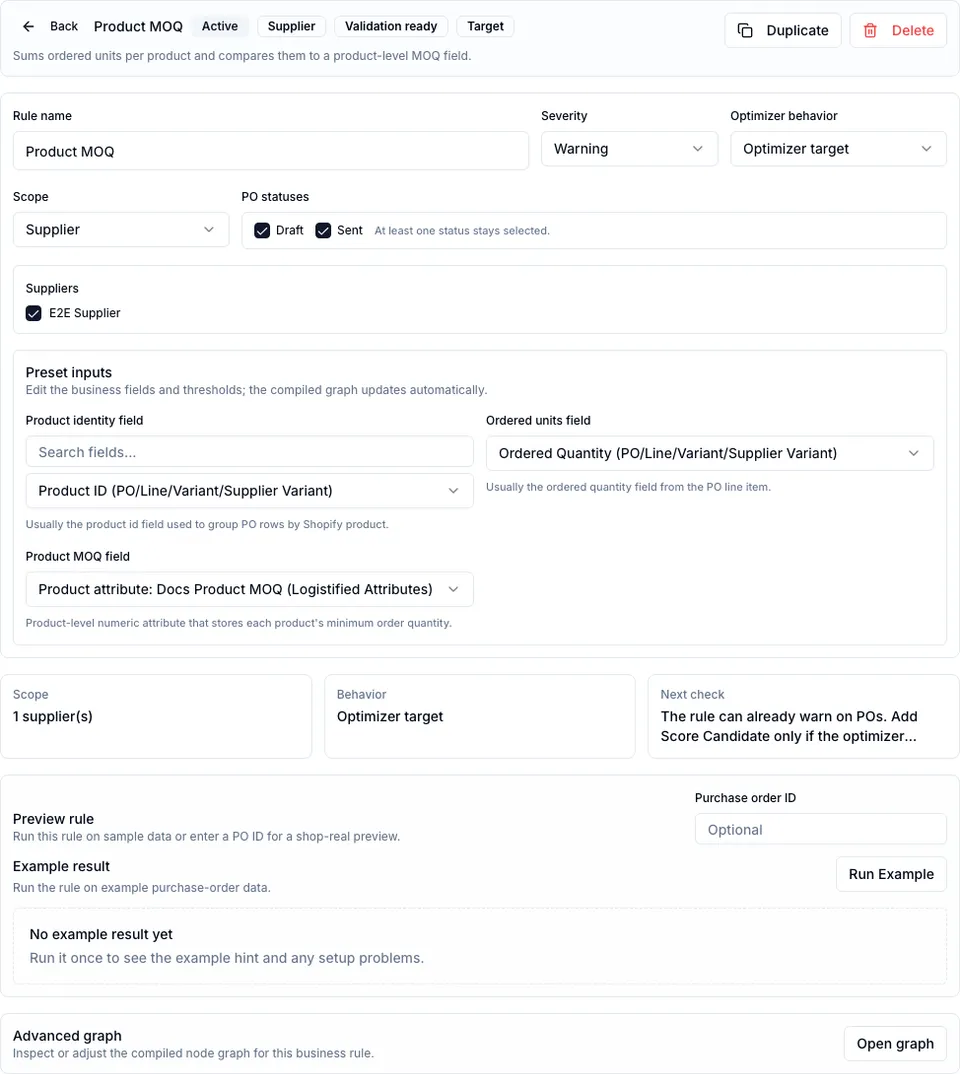
| Product MOQ | All variants of each product are summed and compared to a product-level MOQ field. | Can increase/add variants until product MOQ gaps are filled. |
| Group coverage | Active groups cover available supplier variants in the same group. | Can add missing variants from uncovered groups. |
| Ratio / bundle | A numerator measure divided by a denominator measure reaches a minimum ratio. | Evaluates the ratio; additive fixes depend on candidate data. |
| Fill capacity blocks | Current capacity block is underfilled and should move toward the next full block. | Objective-only by default. |
Rule metadata
Section titled “Rule metadata”Every guided rule has the same high-level settings:
| Setting | Behavior |
|---|---|
| Name | Merchant-facing rule name shown in settings, PO hints, and optimizer reasons. |
| Enabled | Disabled rules are saved but ignored. |
| Scope | General applies to all POs. Supplier scope applies only to selected active suppliers. |
| Statuses | Only Draft and Sent are valid active statuses. At least one must be selected. |
| Severity | Controls the PO hint tone: Info, Warning, or Error. It does not by itself make a rule hard. |
| Optimizer target | Makes the optimizer treat the rule as a target/limit. Warning-only rules still show hints but are not a target. |
Field binding
Section titled “Field binding”Some presets can use built-in PO fields immediately. Others need a field binding:
- Product MOQ needs a product identity field, ordered units, and a product-level MOQ field.
- CBM and weight rules need a per-unit Number field.
- Group rules need a group key or purchase family field.
- Ratio rules need two numeric fields.
Constraint Studio suggests fields from semantic roles first. It does not silently bind an unsafe field when the role or type does not match; choose the field explicitly if the suggestion is missing.
Preview and save
Section titled “Preview and save”Before saving, preview a rule against sample data or a real PO. Real-PO preview is the best check because it uses your PO lines, supplier, fields, and current saved values.
Preview and evaluation do not change PO quantities. They return pass/fail state, severity, and missing-data reasons such as missing Product MOQ, Unit CBM, Unit weight, Group key, or Purchase family.
Settings saves are versioned. If another tab changes the constraint settings first, Logistified rejects the stale save and asks you to reload instead of overwriting someone else’s rules.
Advanced graph nodes
Section titled “Advanced graph nodes”Guided presets compile to a technical graph. Most teams never need to edit it, but it is useful for debugging.
Datasets
Section titled “Datasets”| Dataset | What it contains |
|---|---|
line_items | Current PO lines after data-quality exclusions. Use this for normal rule checks. |
all_line_items | Current PO lines before exclusions. Use this when the rule itself must report missing data. |
supplier_variants | Eligible supplier catalog variants, including variants not yet on the PO. |
combined_line_items | Current PO lines plus simulated optimizer additions. |
candidate_line_items | Only simulated optimizer candidate rows. |
Supported nodes
Section titled “Supported nodes”| Node | Input -> output | Main settings |
|---|---|---|
meta.rule | None -> metadata | Internal rule metadata; not needed in guided rules. |
source.po | None -> object | Current PO context: header fields, current lines, supplier variants, optimizer candidates. A normal graph has one. |
source.dataset | None -> dataset | Reads a named dataset. This is valid for legacy/advanced graphs but hidden from the normal library. |
source.field | None -> scalar | Reads one field path, for example line_item.quantityOrdered or a mapped Product Settings/Data Model field. |
source.value | None -> scalar | Static text, number, boolean, or date value. |
transform.extract | PO object/dataset -> dataset or scalar | Selects line_items, all_line_items, supplier_variants, combined_line_items, candidate_line_items, or a nested PO field. |
transform.filter | Dataset + optional compare input -> dataset | Filters rows by field path, operator, and right value. |
transform.map | Dataset -> dataset | Adds or replaces a row value. Modes: copy field, write constant, or calculate math into an output field. |
transform.group_by | Dataset -> grouped dataset | Groups rows by a field such as product ID, variant ID, group key, or purchase family. |
transform.aggregate | Dataset/grouped dataset -> scalar or grouped values | sum, count, distinct_count, min, max, avg; grouped input returns one result per group. |
transform.set_operation | Dataset -> scalar/set/boolean | distinct_values, distinct_count, cardinality_in_set, contains_all, contains_any. |
logic.math | Scalars -> scalar | +, -, *, /, min, max, ceil, floor, round, abs. Used for ratios and capacity blocks. |
logic.compare | One or two values -> boolean | >=, >, <=, <, ==, !=, contains, not_contains, in_set, before, after; pack-size presets also generate multiple_of. |
logic.group_compare | Grouped left + grouped/right limits -> boolean | Compares each group to its own limit. Missing-right behavior can fail, ignore, or use a default. Product MOQ uses this node. |
logic.boolean | Booleans -> boolean | and, or, not, xor. |
logic.date | Dates -> scalar or boolean | before, after, diff_days. |
logic.quantifier | Dataset -> boolean | Requires all, any, or none of the rows to satisfy a row comparison. Line MOQ and min/max line quantity use this. |
logic.coverage | Current rows + universe rows -> boolean | Checks whether PO groups/variants cover the available supplier universe. Can check only groups already present or the full universe. |
output.finding | Boolean -> PO hint/badge | Emits pass/fail text, severity, affected fields, affected variants/groups, and missing-data details. It never changes PO data. |
output.optimizer_score | Scalar -> optimizer objective | Adds a numeric ranking signal for candidate plans. Hard feasibility still wins over score. |
Malformed graphs, cycles, missing nodes, wrong input/output types, missing source.po, and finding outputs that are not driven by logic nodes are rejected. Use the guided workflow unless you need a graph-level rule.
Where rules appear on POs
Section titled “Where rules appear on POs”Saved rules appear in three places:
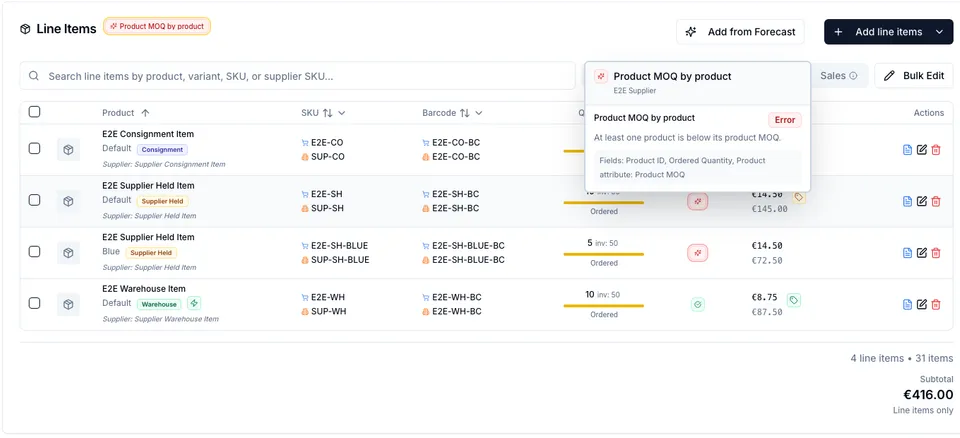
- The Constraints column on PO line items.
- Purchase-order hints in the guided PO preview area.
- The Optimize dialog, where target rules, remaining reasons, and proposed actions are explained.
See also
Section titled “See also”- Product & variant attributes - define Product MOQ, Unit CBM, Unit weight, and group fields.
- Settings -> Data Modeling - expose custom tables and fields through semantic mappings.
- Purchase Orders -> Constraint optimizer - run and apply optimizer plans.
- Guide -> Configure purchase-order constraints - worked examples.
- AI / Agent access -> Operating purchase-order constraint rules - what a connected assistant can build here.